Marketing Success Solutions Springing you Forward in 2021
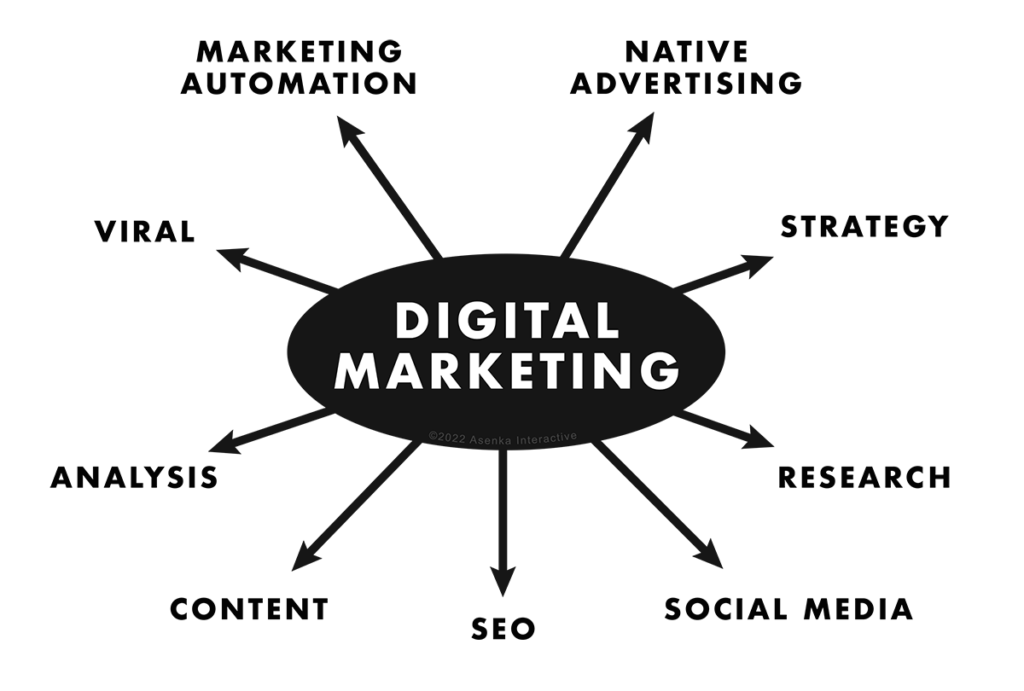
A graph showing various elements pertaining to Digital Marketing: Market Automation, Native Advertising, Strategy, Research, Social Media, SEO, Content, Analysis, and Virality

Spring-forward with some marketing success solutions for 2021

Some helpful tips to help your website not just gain attraction, but keep it.

In 2021, let there be no mistake: Google’s search algorithm is getting smarter. With every year, comes a new way for Google to figure out what websites are deemed to be on the prestigious first page. With the digital eco-system ever evolving, here are 7 tips for your Spring of 2021 to consider to make sure you are ahead of the curve and creating the best marketing strategy for your website and brand.

Strategy:

Doing research into your own industry and your competition will always give you the upper-hand. What is the competition looking like? Why are people engaged in a specific product and compare why your product is better. Marketing just isn’t about clicks, but it’s about understanding where your prospective customers are online and how to get their eye on your website. Once you have that idea in mind, it’s time for you to look at other questions, such as “Is our branding resonating?” “Would the demographic that wants my product engage on my website?” These are are all valid questions and all things that can be fixed. The more research you put in, the more resonating you have to effectively market your brand.

Keyword Research:

Now you know your niche, but the real question may be, how are people searching for what you have to offer? Some people may be searching for resources near them. Others may not be sure of what exact product they’re looking for, but are trying to find out what product is reviewed as the best. Others might be asking a “why” or  “how” question in your industry. All of these search results, can benefit you by creating proper keywords for your website. Understanding this, specifically, is a make or break for most branding campaigns. These specific keywords will give you a way to differentiate your brand/organization from the competition. If you want to take a test-drive and see how this plays a huge role in efforts to attract prospective consumers & clients, feel free to try Neil Patels, Ubersuggest. It’s a great first step to understanding the importance of key-search.

Better Content, Better Rankings:

Your company has a solution. A customer is looking for an answer. If you are putting out content that provides practical value to prospective customers, you are doing three things in this very moment: You are engaging someone who may be a future customer, you are giving them free information that truly is helping them and you are giving google a chance to see how long that person stays on your site. The more creative and practical the content the more engaging (images, videos, blog posts with SEO in mind), the less bounce rate your website will have. This tells Google that your website has no business being on page 8. If writing isn’t your thing, you can always work with a professional copywriter.

Social Platforms:

Social media is the first thing people think of as a way to boost their signal and get their message and their brand across to others, as effective as possible. While platforms are definitely a cornerstone for digital marketing, if you are new, try one out one at a time. Think of each platform as a means to connect a client to your services, for a specific demographic. If you’re able to see which social media platforms work the best for you, remember to think of them as “parent platforms”. Yes, we’re talking the Facebook and Instagrams of the world. However if your clients are going somewhere else to find what you are looking for, don’t let that stop you. For instance, after you do research and find that most people are buzzing about your industry on LinkedIn, then by all means, get on there and start engaging. But as a word of caution, always try to explore different platforms independently to get a better grasp at which platforms are working for you and which ones are merely, confetti. If you find out that you’re not getting any views or likes on Pinterest, it may just be because your customers are for the most part, elsewhere. Research your industry on each platform and you’ll come out with a better understanding as to where your viewership lays.

User functionality & Speed:

A fast website sounds like a no-brainer, but let’s take a deeper dive. If a user searches and sees your website come up, reads the description in google and clicks on it, but spends more than 8 seconds waiting for your site to load properly, you’ve already lost that user. There could be several reasons. Maybe your site is beautiful on desktop, but you haven’t been making your website mobile-friendly, a priority. Maybe your on a slow server with large images o just need a re-design. This also includes readability, anywhere within your site. If a person can scroll around and find the content they are looking for quicker, and can read it without it looking noisy, you’ll be able to keep people on your website.

Our mentality is customer first, Google second:

Always create a website with you customers in mind first, but with Google as an onlooker. This means that you are creating content with the purpose of helping prospective customers as well as ranking well on search engines. Have you followed simple SEO rules? Does your site have strong backlinks? Are you relevant to the terms people are searching? Just use google search to see how you are doing. Pretend you are a great prospect and search what they would. See how you rank to get a good idea of your strengths and weaknesses in your digital landscape. Learn the best SEO practices and keep in mind that the fundamentals aren’t overtly changing, despite the massive push for digital in the last year.

Keeping these tips in mind will definitely strengthen your digital marketing efforts for 2021. If you need extra help on developing your site or traffic growth & measurement, please feel free to set up a free strategy call with us anytime.


We’re always excited to hear what you are planning or to help you plan it!

Tips on Marketing to the Isolated

As the world is scrambling to understand how to be safe and what life will look like in the short and long term, business are scrambling to stay afloat amidst daily changes to rules and customer behavior. So how does one effectively market in this new climate? The reality is, we don’t really know. These times of crisis drive new ideas and new solutions, some of which will fail and others that will open new industries.

Let’s explore some ways to continue to reach out to your customers, provide new services, and few new clients or even new markets. For now we’ll focus on using the same tools we have now to connect with your market in the “new normal”.

Digital

Email: If your inbox is anything like mine, it’s flooded right now with messages about COVID-19 from lists that I haven’t heard from in years. Most of these emails are full of information that doesn’t effect me at all, but one company took the approach of giving some very good practical tips of staying entertained and engaged while stuck at home with the family. I read every word. This business was not in the entertainment space at all which made it all the more “real”. Some thoughts to consider when doing an email blast in the next few weeks:

  • Keep it short
  • We are all in this together, so write from that perspective
  • Give helpful info, not too promotional, unless what you sell is particularly useful right now

Ads: People are searching for things they probably never have before and any residual contingent of the online shopping-timid are finally taking the plunge. Homes are crowded, kids are struggling with technology, many are recently jobless. Can your products or services be a help, if so, you might consider running some ads for quick visibility. TIP: Don’t use coronavirus or COVID-19 in your ad text or it likely won’t show on Google.

Social: So many meetings are moving to Facebook live or Zoom or whatever. So many groups are forming for online discussions. Personally, I’ve found that these online meetings have taken existing business relations a little deeper. There’s something about “being” in another person’s house that takes a relationship to a slightly different place. These are generally easy to use well worth jumping into for individual client meetings, or larger events. Make it easy for people to reach out and request or even start a meeting.

Video: Quick video clips keep things real and offer an opportunity share your environment with your market. Sharing on social or on a website, or even short ones via email or an email campaign are a great way to stay top of mind. As with other things, keep it short, helpful, relevant, and not too sales-y unless you have a great idea or product. Home grown videos are OK for some uses, but you may want to go professional depending on how they’ll be distributed.

Webinars: So many meetings are moving to a video chat model, but consider a webinar to schedule a conference or if your audience is large. It’s a great format and in some cases, you can re-purpose the content for future meetings, paid or unpaid.

Website: Keep things updated here, any major scheduling changes or differences in the way you’ll be doing business should be front and center. If you aren’t a regular blogger, this could be a good time to get started.

Offline

Just because people aren’t out and about as much doesn’t mean there is not opportunity. People are still outside, walking and exercising in open areas. People are still food shopping and going out for other necessities. While I don’t think this is the time to invest in billboard ads, maybe something less common like skywriting or those banners you always see at the beach could gather lots of eyeballs.

Postcards: People are still getting mail, and with the increase in digital communication, the good ‘ol mailbox might be a great way to get a specific message out, especially to a small local area if that’s your market. If you are really slow, you could even go house to house, (mailbox hangers) but check the legality on that in your area and obviously make sure you are practicing any applicable safety measures like gloves, distancing etc.

Flyers: If you are a local retail company that can stay open, it’s time to team up with others in the same boat. Co-promote with flyers in each other’s businesses, maybe the larger grocers or pharmacies would be willing to keep some of your flyers in their stores as well. Buy a display rack for your store and invite other local business to provide you with flyers to display. Reciprocity is a powerful thing and likely they’ll reciprocate and do the same.

Signs: Grab some lawn signs that say you’re still open, or that you are offering curbside delivery. Let people know what you have available for them. Maybe even look into some neon window signs (is that even a thing anymore?) Light can be powerful and grab attention. Decorate the outside of your store with holiday lights and shine them bright.

Calls: Spend the slow time calling clients or regular customers. They are likely feeling disconnected and a call just to see how they are doing and how you can help could be just what they needed. It may not bring in revenue that moment, but the relationship strengthened will be worth much more in the long term.

Have fun. That doesn’t mean be disrespectful or take the situation lightly. But with a heavy cast over much of people’s lives, a little levity helps remind people we are all still human and that there is another side to this. We just can’t see it clearly yet.

If your business is struggling and you want to talk about how any of these ideas might apply to you, we are available for a free, 30 minute brainstorming session. There’s no commitment but if our ideas and experience can help you through this time, we’d love to help.

Don’t lose your shirt with Google Ads

Google Ads is a paid platform for serving up ads primarily on search result pages but also on other sites and videos. This can give you exposure to the plethora of users that search Google every day. Google makes it very simple to create ads by using keywords to define who you want to show your ads to. The hope is that you’ll get tons of new business when you start running these ads, but that is not always the case. In fact, unless you have some experience in setting this up, it’s likely that Google will be the only one getting the new revenue… yours.

If you are not familiar with the way these search ads work, let’s take a moment to cover the basics. You pick the keywords that you want your ads to show for. You write the ad text. You set the budget of how much you’ll spend each day. You set the geography and some other details of when and where you want your ad to show. Google will show your ads when related keywords are searched. When your ad is clicked, the user goes to your site and you pay Google. How much a click costs depends on how many other companies want to be shown for those same keywords. The more competition, the more it costs. Now we could write a blog post of each of those steps, but that’s the basics of how it all works.

This is all fine and good on the surface, but when you peel back the onion one layer you see that much of the traffic to your website is not looking for what you are selling. Let me explain why, and then we’ll get into a solution. The keywords you type in Google when you set up a campaign will show your ad to anyone searching for those words OR any closely related words. Google does this to make sure they capture all the possible related traffic. This means when you select the keywords plumbing company that your ads will show for someone searching plumbing company near me, plumbing company jobs, plumbing company supplies, even drain cleaning service, free plumber service coupons or worst plumbing company could qualify as a close variant. Ouch. Obviously paying for clicks on these search phrases would NOT be recommended.

4 Steps to Good Traffic

All is not lost though. There’s a solid 4 step process to putting together a campaign that is both targeted to good traffic, and also competing on less general (more specific) terms whose clicks are generally less expensive.

Step 1 – Group your keywords

This is good practice for aligning the right message with the right terms. When someone is searching for hairdresser for women, you’d likely want them to see different key points than hairstylist for men, even though your business may service both. Ideally, the page the ad directs them too is also unique content, but that can come later. Theoretically, good messaging will help to deter users who are looking for something else from clicking on your ad. However, in our experience, we believe that very few users actually read the ads. Which leads us to the next point. 

Step 2- Use Broad Modifiers

This is a tricky part but makes the biggest difference. As we saw above, broad match keywords will trigger your ad for too wide a range of terms. A Broad Modifier is a way to tell Google to require that every word in this phrase must be present. You simply add a + sign before each word that needs to be required. For instance +women’s + hats  + scarves will show ads for women’s hats and scarves but not women’s clothing, which would have shown as a broad search term. You can be even more specific requiring certain phrases or even an exact match (which isn’t really exact, but close). Google has more information on this here.

Step 3 – Monitor Actual Search Terms

Google ads will show you the exact terms that people typed in that triggered your ads and then clicked on them. This is the best way to determine how clean your campaign is setup. When you look at this list, you should see queries that you think are reasonable for what you are selling. If you don’t, you’ll need to go back and clean up either your keywords or add something called negative keywords to help clean up the traffic you are paying for.

Step 4 – Negative Keywords

So if you like most of the traffic coming through from your broad modified keywords, but still a few a leaking past that you don’t like, you can add negative keywords which tell Google, if this word is present, DON’T show this ad. It’s a powerful concept when paired with narrow keyword set. Say for instance the terms all looked good,  personal injury attorney, lawyer for injury, on the job injury lawsuit, but every now and then you also had clicks to your site from terms like personal injury lawyer jobs, or personal injury law career. This is a perfect place to add negative keywords for job,  jobs and career, careers. In no cases would you want to show ads for those searches so you can keep your other settings as is and just cut out the job seekers.

When you do this well, you should see that while the overall amount of clicks you are getting may have dropped, the conversions for the people you are paying for should go up because they are exactly what you are looking for. The other thing you might see is that your cost per click has dropped because the very broad, highly competitive terms that everyone is bidding for are no longer on your radar. The searches you are paying for are more specific and likely less competitive. The real goal regardless of traffic or cost per click is to get your cost-per-conversion down. This factors in all the fall off in the process and lets you see, on average, how much you are paying before one person completes a desired action, like filling out a form.

Keep these tips in mind as you are managing your campaign. This is not a promise of success for the campaign, there are so many factors to deal with. It is however, a way to make sure that in the process, you don’t lose your shirt! 

PPC Made Easy As 123

1. The WHAT of PPC

Google, the most popular search engine in today’s time, has created a digital marketing tool called Google Ads. Google Ads provide the service of prioritizing your website into multiple areas of search results. Typically, if a user searches for anything on Google all of the results generated are called organic results. The organic results are formatted based on many factors, but Google’s goal is always relevancy. The user has no say in their natural organic ranking; they could be first or on page 67 and never be seen. What makes Google Ads so effective is that it gives the user an opportunity to be presented as a normal Google search result, which exposes many those websites. By paying to be integrated into the top search results, it is bringing more traffic to your website which leads to more business.

(Demonstrated in this image is that if the result is an ad, next to the URL it says “Ad” but other than that it looks like a completely normal search result.)

PPC stands for Pay Per Click, PPC’s most common example is Google Ads. Each ad shown is an impression. When someone clicks on the ad, a specific amount of money goes to Google Ads for bringing people to your site. Traffic is good but why do you want a visitor on your site anyway? Likely, there is a specific action you’d like them to take. Therein lies all the magic of PPC.

2. The HOW of PPC

In order to make your website accessible to a relevant consumer base interested in your product or service, you customize what searches, also known as search queries, will trigger your ads. A search query is what someone on Google would type into the search engine bar. Keywords are terms that a website owner feels, or research shows, will bring the best traffic to their website. Keywords are typically popular terms, which can reflect in the cost from Google Ads going up. However a “longtail” keyword is an ultra specific phrase that attracts fewer impressions. Hopefully, the impressions it does attract, are much more likely interested in a purchase while being more cost affordable than the general keywords. An example of a keyword would be someone who Google’s ‘chandelier’. This potential customer is going to find a wide variety of results and just scroll through to the specific one they had envisioned. An example of a longtail keyword would be a business that specializes in antique crystal chandeliers. Any business specializing in a specific product would most likely want to narrow that general search down and wait for someone who knows they want an antique crystal chandelier. They may even want to make the longtail keyword, ‘antique 1920’s crystal chandelier’.

3. The WHO of PPC

Google Ads wants you to help them and if you do then they will in turn help you. When your keywords are spot on and you are providing relevant results for Google’s users, this provides the users with what they were looking for leaving them satisfied. Having a clean organized landing page allows for users to continuously stay on your page without aggravation and find what they are looking for. When users are happy to land on your page because of the previously stated characteristics, Google will decide you are an ad that is beneficial to their users. This opens up opportunity for your website. Google will prioritize you above other ads using the same keywords, as well as lowering the price you will pay for each PPC.

Using PPC is a time consuming process that requires continuous attention and modification. For businesses that are not capable of the time dedication or are not equipped to properly study the analytics, there is the option of hiring an outside business that focuses on Digital Marketing and Website Development, such as Asenka Interactive. But for those who are capable and ready to begin just remember: 

  • Update your keywords- study the analytics of which specific search queries are creating the most impressions as well as conversions and eliminate those that don’t.
  • Always look for growth regarding your landing page- figure out how to make it better for users.
  • Analyze and adapt- see what is beneficial and what just isn’t working based on your analytics, then adapt your course of action accordingly. Try new things regularly but never stop measuring.

Do you use a Google Map on your website? If you do, time to whip out that credit card

As of June 2018, Google maps using API keys changed from free to a pay-as-you-go billing system. Meaning, if you want to keep utilizing their interactive maps on your website, you’ll need to provide them your credit card information in your Google account.

The free tier that Google offers allows up to 28,000 map loads per month for these dynamic maps and Google offers a $200 (Google) credit to your account. If you’re getting over 28k loads, Google has a detailed pricing plan that they offer here.

So, who is this affecting? Well, almost EVERYONE! There are over 4.5 million websites that use Google Maps*. Tons of eCommerce sites are the first to be affected since most use the Geolocaton tool from Google.

There is a way to use a basic Google map for free but there is no customization and it only allows for a single pin point. You can embed the Google map and share a business, address or directional search. If this makes your head explode, try some of the Google map alternatives like MapBox or Open Street Map.

The price for dumping Google Maps goes up a little when you factor in SEO. Having a google map linked from your Google My Business page is what’s best for your SEO. With that being said, whether you decide to stay with Google or kick them to the curb, our advice is to keep a map on your website.

It helps your customers, it’s user-friendly, and it’s good business.

Guide for Managing & Getting Online Reviews

Customer service and help concept – business operator sitting at rustic wooden desk with six dices with contact and information symbols on them placed in a row.

When was the last time you did a search for your company? If the first page of google’s results are scattered with 1-3 star reviews of your company on various social sites, you may be losing potential customers. Often companies won’t hesitate to spend money on their website’s visibility, but fail to see the importance of managing their online reputation. While ranking high for relevant searches is key to being considered for future business, having poor rankings will erase any benefit you get from SEO. Follow this guide to make sure your business isn’t missing out from a poor online reputation.

1. Review Notifications

Determine which directories or social sites are valuable to your industry. If you aren’t sure, try a few different related searches and see what social sites comes up often. Moz put together a great guide on top citations by industry.  Once you have a list of the most important review sites, start claiming your listings or signing your company up if there is no listing.  You may want to use a different email than a primary address since you will get a lot of solicitations, but make sure it is one that you periodically check (at least once a month).  This will alert you to any new reviews your business gets in a timely manner.  If you get notified of a bad review, you will be able to respond quickly, and you can thank someone for a nice review as well.  If you are able to figure out who left the bad review, you can try contacting them directly to see if you can solve their problem, in hopes they will remove the review.  If that does not work, you can respond publicly in a professional manner, urging them to contact your customer service to resolve the issue.  This will make the company look responsive and considerate to their customer’s needs.

2. Don’t Fake or Buy Reviews

While it may be tempting to just create fake social profiles and write glowing reviews of your company, it is illegal and can result in hefty fines by the FTC.  This can also include deceptive reviews as detailed in the FTC’s review guidelines.  Examples would include an endorsement from an individual that did not disclose that they received some sort of financial or promotional incentive in return for the review, or if the reviewer has a bias towards the company (think family or friends).  The one area that is excluded would be if someone wrote a review about a product or service that a friend or family member received, and they could provide honest feedback (ex. My cousin got his floors refinished by XYZ company and they look great!).  There are also services such as fiverr that offer paid reviews, however these are against the terms of service of any website and will result in having the review taken down, or worse – your account banned.

3. Make It Easy

While it may seem like nowadays any product or service you purchase will bombard you for reviews, reaching out to recent customers is still the most effective way to get new reviews or bury old bad reviews.  The key is to stand out in your request and make it easy for the client to provide the feedback you are requesting.  Sending a personal email thanking the customer for their purchase and politely requesting a review will result in a lot more reviews then an automated message or text.  You can ask repeat customers that you have a personal relationship with if they would mind letting others know about their experience with your company.  Finally, create a webpage on your site or have some links in an email signature that make it easy for the potential reviewer to find your company’s listing in order to provide the review.  Asking “can you review my company?” will result in an email testimonial – which is nice, but not helpful for your online presence, similar to testimonials posted on your own website.

Now that you know the steps to getting online reviews and improving your company’s online reputation, go get some 5 star ratings!

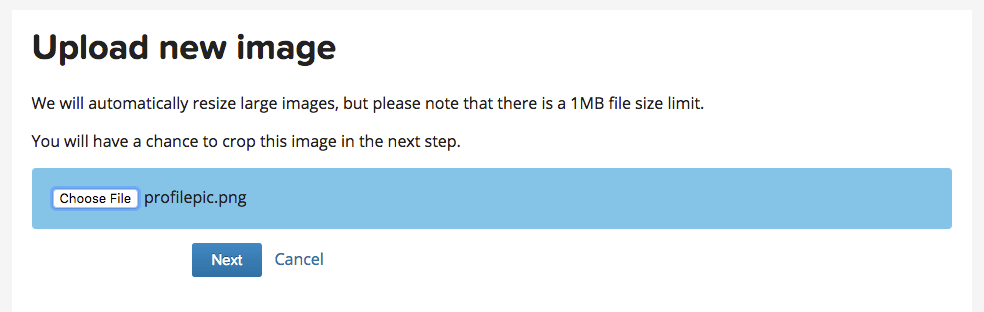
How to Add a WordPress Profile Pic with Gravatar

Ever see a WordPress blog post that includes the user’s profile pic with their name? If you would like to set up one for your account, it is easy to do with Gravatar through WordPress.com. Note, the email address you use for Gravatar will have to be the same email address assigned to your wordpress account for this to work, and the profile pic will appear on comments or posts on other sites that use Gravatar when logged in to your account.

Step 1. Log in to the backend of your wordpress site, navigate to Users, and find your account.

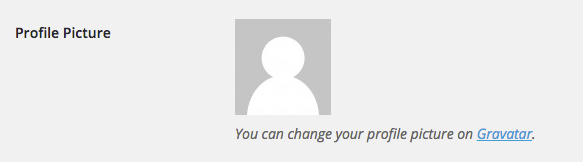
Step 2.  Under the profile pic, select the Gravatar link


Step 3.  Select Create Your Own Gravatar button


Step 4. Create an account with your wordpress user account email


Step 5. Activate your account through the confirmation email


Step 6. Log in and select add a new image under the correct email address


Step 7. Find the picture you want to use as your profile pic, and crop to your liking.


Step 8. That’s it! Refresh your browser and log back in to your website dashboard, and you should now see your profile pic in your user profile.

How to Remove Duplicate Google Map Listings

After a lot of research and hours on the phone with Google Maps support, hopefully this guide will help anyone that runs into the same situation with Google creating multiple map listings for one office location. Apparently this is a common problem for doctors and dentists as Google seems to want to give each individual their own listing, which is not only annoying to maintain but a headache if they no longer work there. Best practice also tells us we should only have one listing per location, so below are the steps to fix it.

    1.  In order for this guide to work for you, you must be using the same Google account that your current website is claimed in the google search console property, otherwise you will need to verify the listing with a phone call or postcard. screen-shot-2016-09-13-at-10-52-14-am
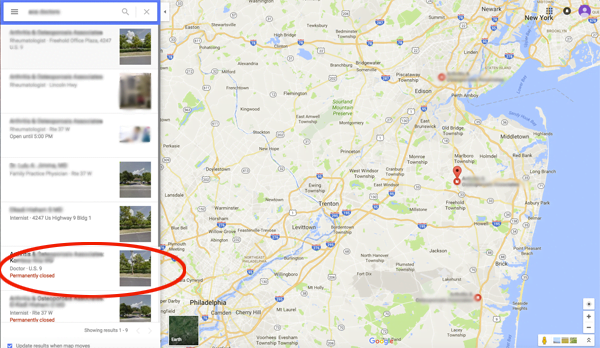
    2.  Go into Google Maps and find the listing you would like to delete.  In this example, the one has been marked permanently closed since it was an old doctor that no longer works there.
    3. Claim this business.  It should be instant verification if the website is claimed in your search console.screen-shot-2016-09-13-at-10-45-58-am
      screen-shot-2016-09-13-at-10-46-21-am
    4. Go to your google places dashboard, find the listing, and click Manage Location. screen-shot-2016-09-13-at-10-47-17-am
    5. If marked permanently closed, click Review and reopen the listing.  Then go into manage listing and click Submit at the bottom to verify all the information and to publish the listing.screen-shot-2016-09-13-at-10-47-44-am
    6.  Now go back into your google dashboard and find the now published listing.
      screen-shot-2016-09-13-at-10-48-33-am
    7.  Click Manage Location and find the menu in the top left, and then click Settings.
      screen-shot-2016-09-13-at-10-48-54-am
      screen-shot-2016-09-13-at-10-49-09-am
    8.  Scroll to the bottom and select Delete Page. screen-shot-2016-09-13-at-10-49-23-am
    9.  Google will make you log back in to your Google account, and then select all boxes and click Delete Account. screen-shot-2016-09-13-at-10-49-42-am

And that should be it! Give Google a day or two to update their map listings, and you should no longer see the duplicate listing in search results.